• Skip to main content
KateOGroup-Logo
  • Home
  • About
  • Services
    • Custom Branding Design Services by KateOGroup
    • Custom WordPress Website Design
    • Design & Maintenance Services
  • Portfolio
  • Resources
  • Blog
  • Contact

Blog

May 25 2016

WordPress SEO Tips

Wordpress-SEO-Tips

I put together this list of WordPress SEO Tips together because most people hear SEO and either think:

  • I know I need it, but I don’t know how to do it.
  • Isn’t it expensive?

Following the tips below will help you DIY your website’s SEO.

5 WordPress SEO Tips

1. Install the Yoast SEO Plugin

The Yoast SEO Plugin is a free plugin you can find out more information about here. To install it first log into the dashboard for your WordPress website, head to the plugin section and search for Yoast SEO. Once you see it in the list of available plugins, click to install it.

I often refer to this plugin as SEO 101 or SEO for Dummies. Once the plugin is installed, open an existing page or post on your site. Scroll down below the content editor section and you will see Yoast SEO. In this section you will be able to edit the title, slug and meta description so that they all contain your focus key word or phrase. Hopefully the trickiest part of all this will be choosing the key word or phrase for that page or post. Once you’ve entered the key word or phrase, just below you’ll see the Content Analysis section.  That will act as your report card for the content on that page.

You want as many green dots as possible. Red means work on this item, orange means this could use some work and green means this item looks good and needs no improvement. The Content Analysis section will also give you suggestions on how to improve your SEO for this page or post.

2. Each page or post should include links.

Outbound links to other sites are best but links to other pages on your site are also a good idea. If you don’t have a site to link to, why not end the post with a link to one or several of your social media profiles? Not only will this give you an outbound link but it will also encourage your readers to connect with you in other places.

3. Always include an image!

This could be a picture or a graphic you created to go with the content on that page or post.

4. Add new content.

This should be the #1 item on my WordPress SEO Tips list.  But since this tip isn’t WordPress specific,  I’m putting it at #4. The search engines love, love, LOVE new content! New content tells the search engines to come and crawl your site and take a look at what’s new which also increases your ranking. Content can be a new post, adding a few sentences to an existing page or even uploading new images.  Though be sure your key word is in the title of the image.

5. Share your content on Social Media.

Be sure to post, tweet and pin links to your recent blog posts. These links to your content tell the search engines that your content is important and help establish you as an expert on the topics you write about.

These are just a few WordPress SEO Tips but if you follow them you should begin to see an increase in traffic to your website!

Need more help with your WordPress Website, visit our blog post on Website Basics.

Written by Kate O. Lynch · Categorized: Blog, Business · Tagged: DIY SEO, SEO for Wordpress, SEO Tips for Wordpress

May 10 2016

5 Ways to Network Your New Business

Network Your BusinessYou’ve settled on a name for your business and have created a basic style for your brand it’s time to make yourself known and network your business.  You might be asking how or where do I start? Networking opportunities are all around us and thanks to social media it is now easier than ever! Here are 5 ways to network your new business:

1. In Person Networking

A great tool for finding networking opportunities in your community is Meetup.  Meetup offers a wide variety of groups you can attend, so no matter your industry you will find a group for you.  I’ve also found that when you attend an in person networking event you are often invited to attend another group.  An added benefit of in person networking when you’re a solopreneur is the opportunity to interact with other people and help you avoid any feelings of loneliness.

2. Reach out to like-minded professionals to provide and gain the support of your peers.

I’ve found that one great way of doing this is joining online communities like Facebook Groups.  A few of the great groups I have joined are The Rising Tide Society (this group is full of photographers), Savvy Business Owners & Being Boss.

3. Social Media

Social Media is a great way to network.  Find the platforms you enjoy most and spend your time on those sites.  Don’t just post your photos or statuses, be sure to interact with other users though comments and likes.  Don’t be afraid to show off your personality.

My personal favorite is Instagram but I also like Facebook and Pinterest, and have recently joined Snapchat.

4. Don’t Be Shy

When you’re first starting your business, tell everyone about what you do. Now don’t be pushy or annoying but don’t be shy about what you do. You might think you’ve told everyone you know about your new venture but everyone is so busy these days they might have missed your announcement.  I’ve found that you never know who can become a customer or could connect you to a future customer.

5. Build a Community

Initially this might be something as simple as a hashtag or could be sending out a newsletter.  You don’t have to jumpstart with your own Facebook Group right off the bat!  Start simple and build from there!

Where do you spend most of your time networking your business online?

Want to be the first to know when these designs are available?  Sign up for our Weekly Notes through the form below:

Sign Up to Receive Weekly Notes That Dig Deeper Into Topics Like This!

* indicates required


Written by Kate O. Lynch · Categorized: Blog, Business · Tagged: business networking, network your business, networking your business, networking your small business

May 06 2016

Sonya Renee | Custom Rebrand

This jewelry logo design project for Sonya Renee Jewelry was a collaboration with Lindsey Edison Branding & Design. The Sonya Renee Jewelry Rebrand was such a fun project!

Lindsey and I got together over a cup of coffee to brainstorm the colors and style.  After perusing Pinterest for inspiration we settled on Rose Gold and black.  As we went through the design process the black eventually became more of a dark grey.

Here’s a few of the initial logo concepts presented to the client:

jewelry log design

New Jewelry Logo Design for Sonya Renée

With the logo selected it was time to complete the branding process. This is where the real fun starts!

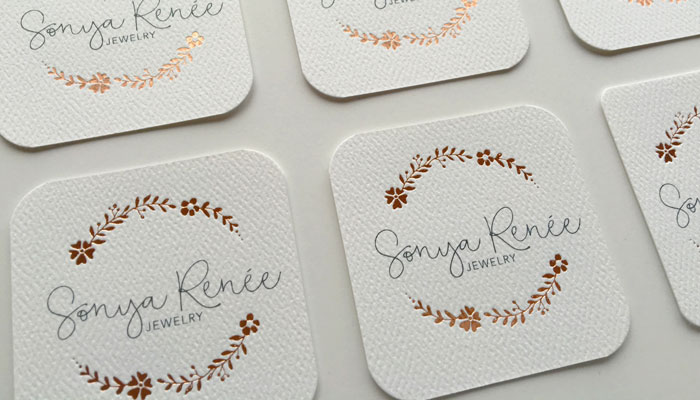
To compliment the gorgeous Rose Gold foil the paper we use for the business cards, stationery and belly bands has this amazing texture. It gives the pieces a bit of a natural look that is balances the foil to give this design an approachable feel.

Heres a look at a few of the additional marketing pieces we created: business cards, packaging and stationery.

jewelry logo design

In addition to the items above, we also created a look book for Sonya Renee’s first launch following the new jewelry logo design.

The combination of Rose Gold and Pewter gives this Sonya Renee Jewelry Rebrand such a whimsical and feminine feeling.  If you need some new jewelry for yourself or for a gift be sure to visit Sonya Renee Jewelry!

Ready to work with KateOGroup

Written by Kate O. Lynch · Categorized: Blog, Custom Branding, Our Work

May 04 2016

DIY Logo Design

DIY-Logo-Design

After deciding the name of your business, you need to begin the process of branding.  A logo is the first step toward branding your new business and it’s important you set yourself up for success even if you don’t have the money to hire a professional…yet.  I recommend hiring a professional to design your logo and help you create your brand, not just because that is what I do, but because they will have the experience needed to get you started on a strong foundation.

If you need to start with a DIY logo in the beginng then I have some suggestions to help you get started in the right direction.

Play it Safe

A black and white logo is the safest way to start.  Color can easily be introduced down the road.  Rather than having to rebrand later you could simply add color to your current logo that way you retain your established brand and the following you’ve work so hard to create for your brand.

Less is More

Don’t worry about incorporating a symbol or emblem just stick with a font initially.  Here’s where you have to make a decision: script, handwritten, serif or san serif?  Above all, make sure the font is easy to read.

Choosing-a-Font

Stay away from trends

Start with a clean and classic logo.  You can always add to the logo later and dress it up when you are ready to hire a designer to transform your logo with a brand design.

By the end of May, KateOGroup will be offering pre-designed logos that can be customized to fit your company name and to the colors of your choice.  These designs will only be sold once so you don’t have to worry about seeing it anywhere else!

Want to be the first to know when these designs are available?  Sign up for our Weekly Notes through the form below:

Sign Up to Receive Weekly Notes

* indicates required


Written by Kate O. Lynch · Categorized: Blog, Branding & Design, Business · Tagged: branding, DIY Branding, DIY Logo, How to DIY Logo Design, New Business, small business

May 03 2016

Website Basics

Website-Basics

Website basics to help you understand the basics of having your own website.

As a website designer, I often find people confused when we first get started. They’ve bought a domain, what else could they possibly need? There is in fact yet another step in order to have their website built. When I ask them about setting up their hosting, this is where I find they are often confused. Hopefully I can help clear the air!

Before getting started, a domain can also be referred to as a web address or URL.

Buying a Domain

The first thing you do is purchase your domain or web address, this is the URL that people will enter to visit your website. Tye cost of this is typically around $12 but can vary depending on who you purchase your domain through. There are countless places that sell domains: Google, HostGator, GoDaddy, etc. You will have to renew your domain annually, unless the company you purchase it through offers multiple year contracts.

Website-Basics-KateOGroup
Hosting Your Website

Whether you go with WordPress, Squarespace, Shopify or one of the many platforms available for building your website, you have to pay a monthly fee to keep your website visible. Depending on who you choose to host your site, this monthly fee could be anywhere from $4 to $30 dollars, possibly even more. Often you can prepay for a year or more at one time and save big time on the hosting fee.

As a personal preference, I build websites on the WordPress platform and recommend HostGator (affiliate link) for web hosting.  Most companies that provide hosting services offer easy to use website templates that could easily be used for launching  a business if you want to wait to have a custom website designed.

What platform is your website built upon? Let me know in the comments below.

KateOGroup uses HostGator for hosting services.  While they may not be perfect we don’t have a lot of complaints about them either.  KateOGroup is an affiliate of HostGator.  We’ve included our affiliate link throughout this post.

Ready to work with KateOGroup

Let’s Get Started

Written by Kate O. Lynch · Categorized: Blog, Business · Tagged: building a website, How to get a website, Small Business Week, Website Basics, where to start with a website

  • « Go to Previous Page
  • Page 1
  • Interim pages omitted …
  • Page 7
  • Page 8
  • Page 9
  • Page 10
  • Page 11
  • Interim pages omitted …
  • Page 13
  • Go to Next Page »

Get In Touch!

howdy@kateogroup.com

Sign Up to Receive Our Newsletter

!
!
Subscribe
Something went wrong. Please check your entries and try again.

Follow Us

© 2025 KateOGroup | All Rights Reserved